Independent guide to Odoo apps

Odoo ERP: Connect CRM, Sales, Inventory & Accounting

Odoo is a suite of business apps that share one database. In practice, an opportunity in CRM can become a quotation in Sales, a delivery in Inventory and an invoice in Accounting, once you've configured each app.

One App Free: one app, plus the apps it depends on, with unlimited users. A second standalone app needs a paid plan.

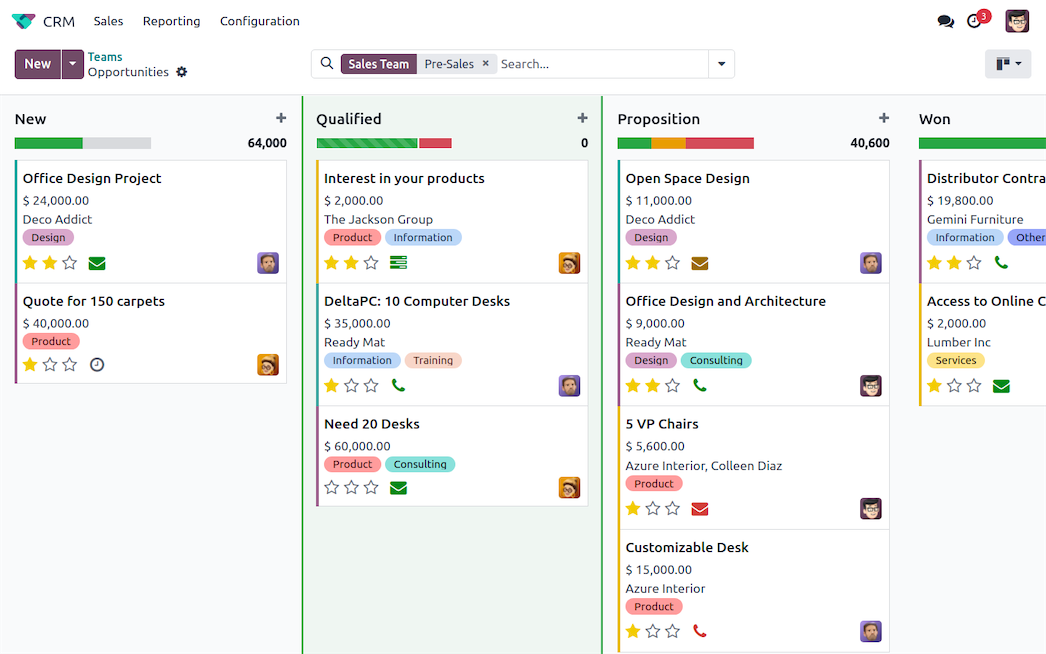
Odoo CRM pipeline in Kanban view, with opportunities grouped by stage
  • CRM
  • Sales
  • Inventory

Official screenshots from odoo.com. CRM in front; Inventory and Sales behind on wide screens.

Find the right app

Which Odoo app handles which job

Start with the task that takes your team the most time. Each row links to the official app page.

Business needOdoo appOften paired with
Track leads, follow-ups and expected revenueCRMSales
Send quotations and confirm sales ordersSalesCRM, Inventory, Invoicing
Bill customers and record paymentsInvoicingSales
Keep the books, reconcile the bank, file reportsAccountingInvoicing, your country's localization
Know stock levels; receive and ship goodsInventoryPurchase, Sales
Order from vendors and reorder on rulesPurchaseInventory
Produce from bills of materials (MRP)ManufacturingInventory, Purchase, Quality
Sell onlineeCommerceWebsite, Inventory
Build a company websiteWebsite BuildereCommerce
Sell in a store or restaurant (POS)Point of SaleInventory, Invoicing
Plan and deliver client projectsProjectTimesheets, Sales
Log and bill hoursTimesheetsProject, Sales

How it works

One order, from CRM opportunity to invoice

Each app reads and writes the same customer, product and order records. You set the rules during setup: pipeline stages, pricelists, warehouse routes and invoicing policy.

  1. Stage 1 · CRM

    An opportunity enters the pipeline

    A lead from your website, inbox or an event becomes an opportunity with an expected revenue and a next activity. Moving the card through stages keeps your forecast current.

    Needs: CRM, with your pipeline stages configured.

    Odoo CRM pipeline in Kanban view
    Official screenshot from odoo.com/app/crm.
  2. Stage 2 · Sales

    The deal becomes a quotation, then a sales order

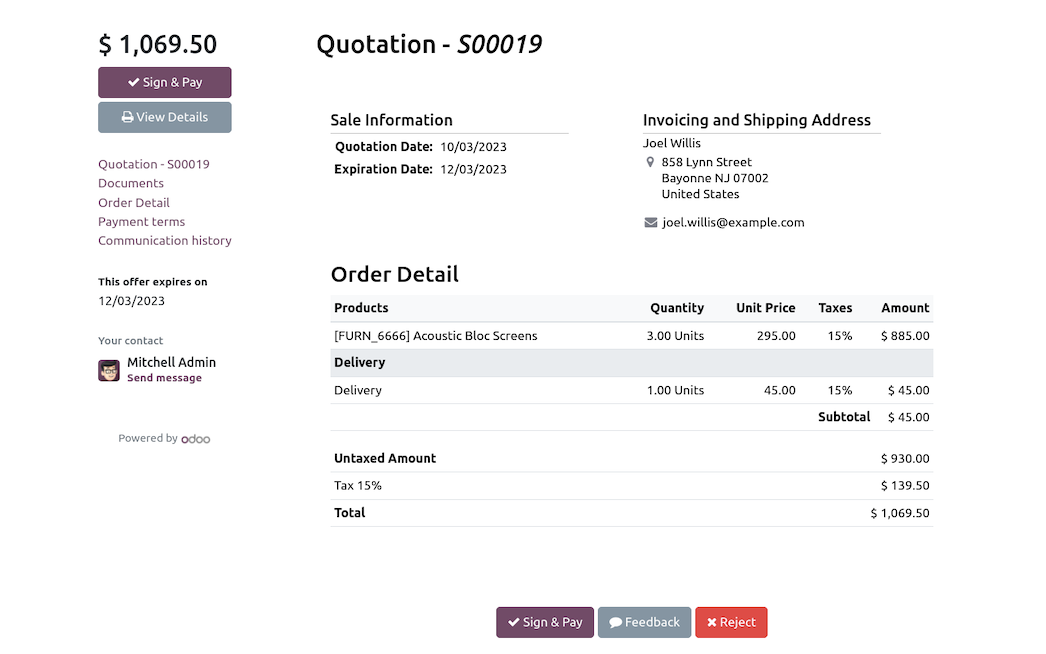
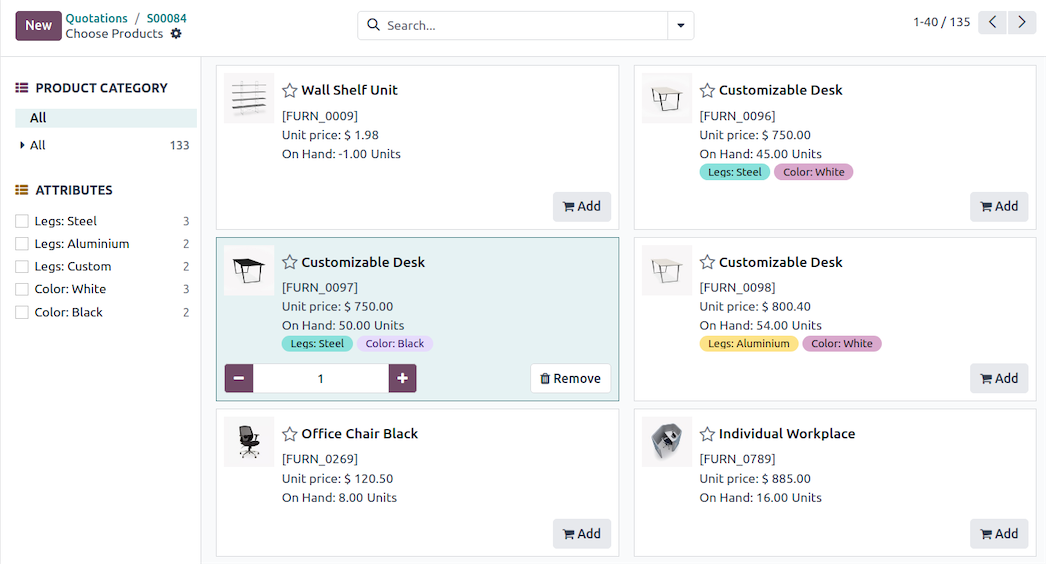
    From the opportunity, a quotation pulls in the customer and products from shared records, with your pricelists and taxes applied. When the customer signs and pays in the portal, it becomes a confirmed sales order.

    Needs: Sales installed alongside CRM; online signature and payment enabled in settings.

    Odoo quotation with products added from the catalog
    Official screenshot from odoo.com/app/crm.
  3. Stage 3 · Inventory

    Stock is reserved and shipped

    With Inventory installed, the confirmed order creates a delivery order. The routes, reservation and picking strategies you configured decide how it's prepared and shipped.

    Needs: Inventory, with storable products, warehouses and delivery steps set up.

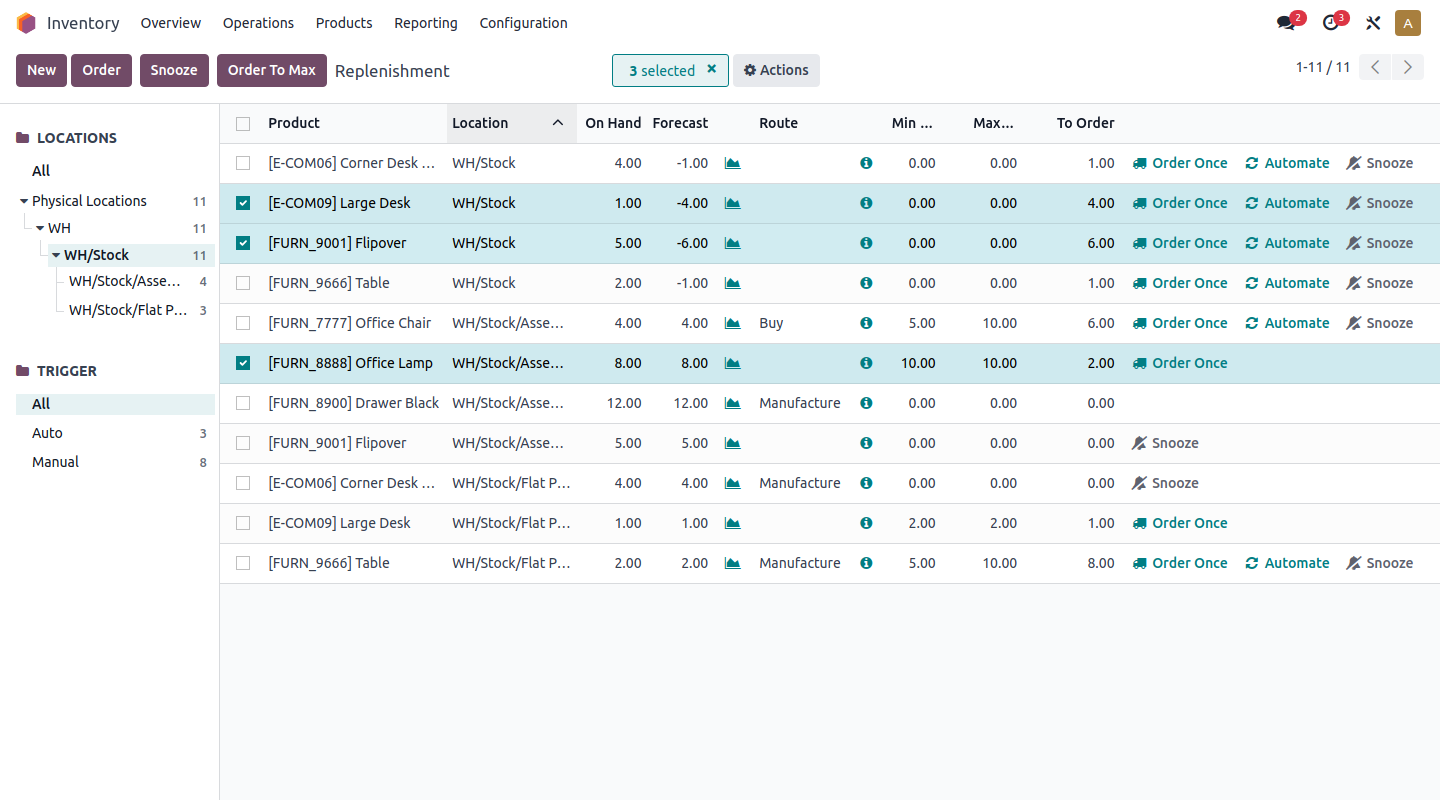
    Odoo Inventory list of transfers, including receipts and deliveries
    Official screenshot from odoo.com/app/inventory.
  4. Stage 4 · Invoicing

    The invoice is posted and paid

    Invoice on ordered or delivered quantities, depending on your invoicing policy. Customers can pay online, and with Accounting installed the payment is reconciled against your bank statement.

    Needs: Invoicing (or Accounting), your country's fiscal localization and a payment provider for online payment.

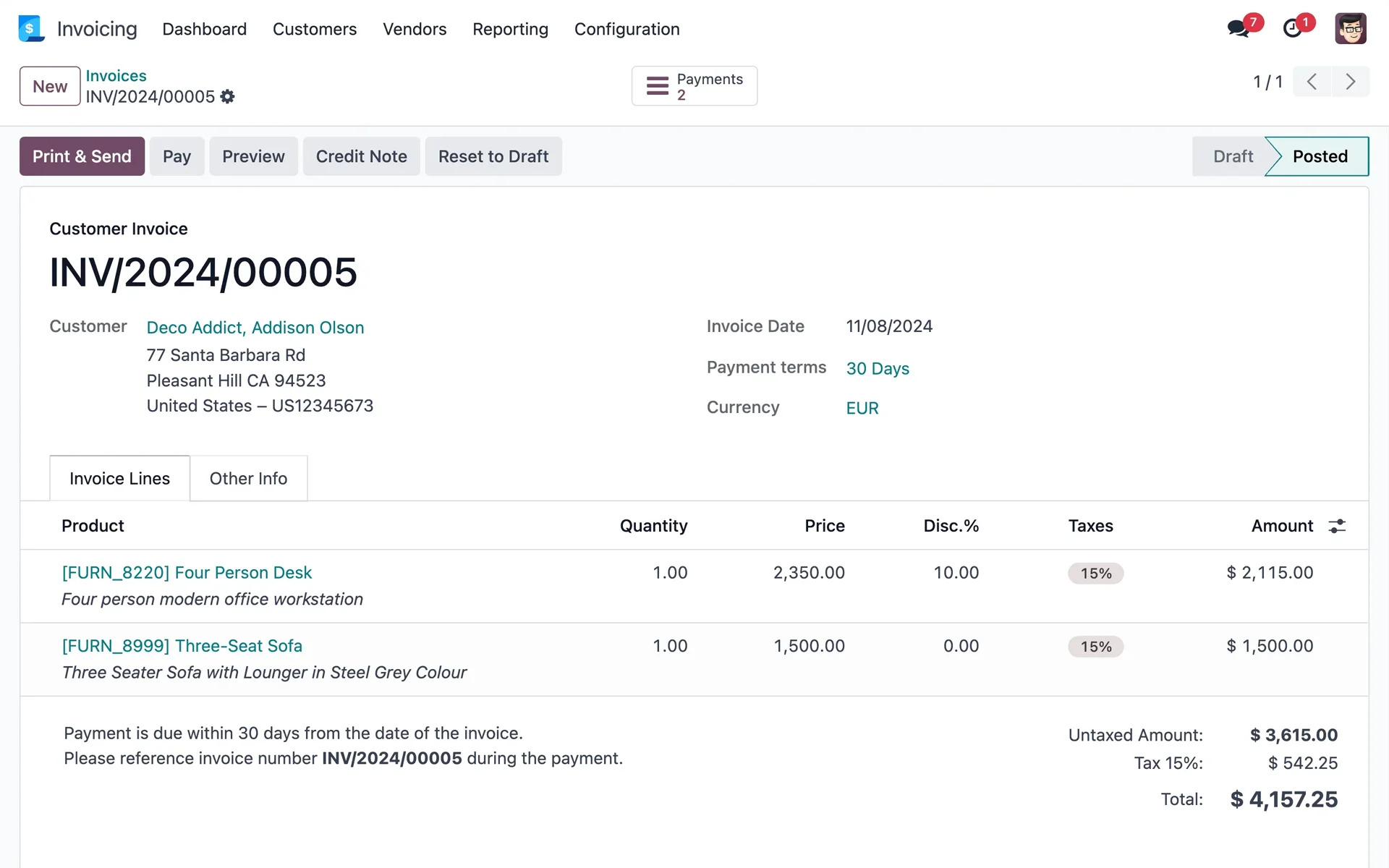
    Odoo posted customer invoice with product lines, taxes and total
    Official image from Odoo's Invoicing app assets on odoocdn.com.

These stages are illustrative. The screenshots come from separate official examples on odoo.com, not one transaction. Want a 3D view? See the workflow as a 3D model.

Odoo CRM software and Sales management

Odoo CRM and Sales: from lead to quotation

Each opportunity is a card on a Kanban pipeline, with expected revenue per stage. Schedule calls, meetings or emails from the card so follow-ups don't slip. When the customer is ready, build a quotation from your catalog. They can sign and pay online, and the confirmed quotation becomes a sales order.

  • CRM
  • Sales

CRM tracks the opportunity and Sales handles quotations and orders. Install both to link a quotation to its opportunity.

Source: odoo.com/app/crm, odoo.com/app/sales

Explore Odoo CRM
Odoo CRM pipeline, poster for the official CRM demo video
Watch on odoo.com instead

Official, unedited Odoo CRM clip (about 12 s). It shows the interface, not how long setting up your own pipeline takes.

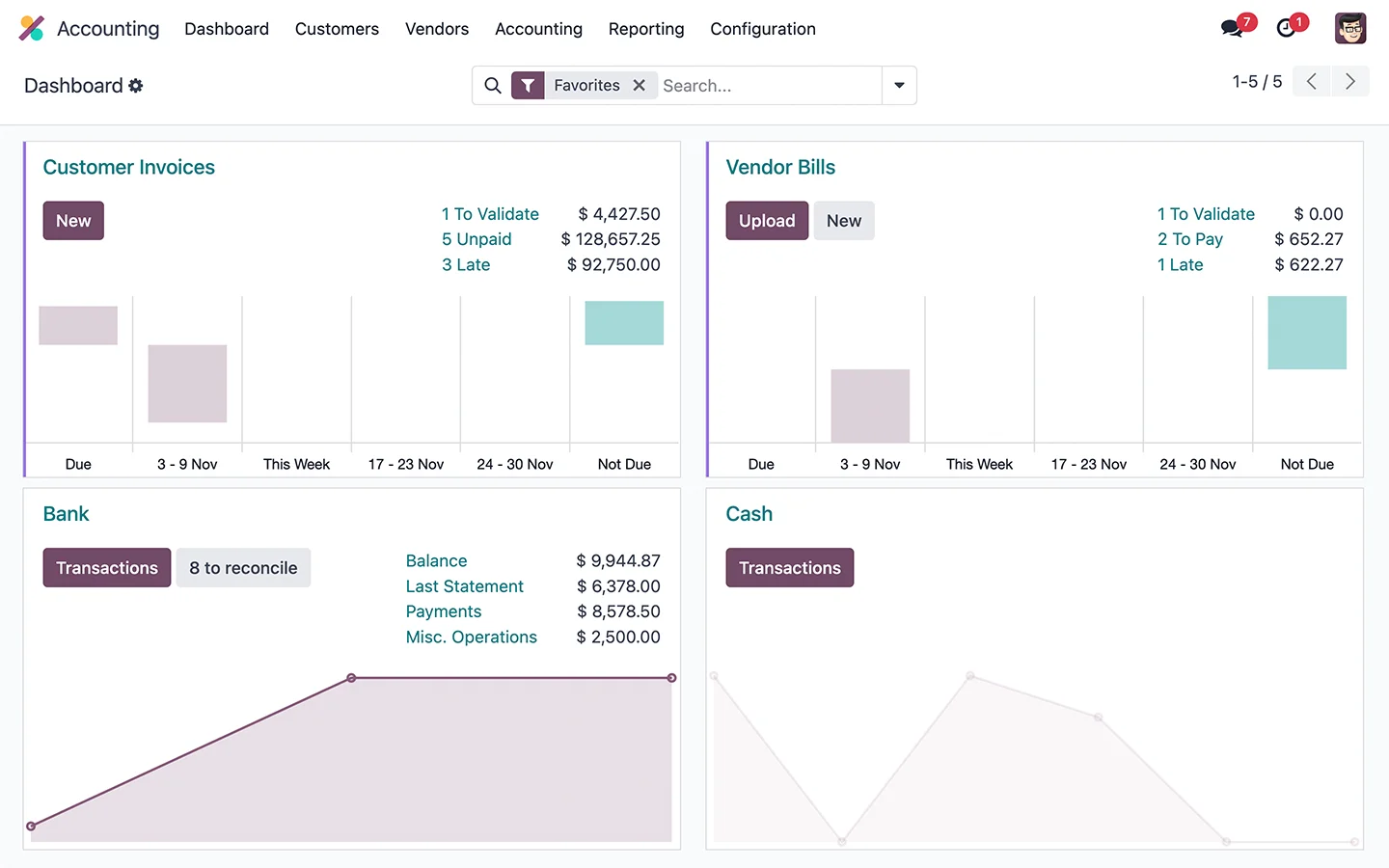
Odoo Accounting dashboard with customer invoices, vendor bills, bank and cash journals
Accounting dashboard. Official image from Odoo's Accounting app assets.
Odoo posted customer invoice with product lines, taxes and total
Posted invoice. Official image from Odoo's Invoicing app assets.
Odoo Accounting dashboard, poster for the official demo videos

Official Odoo clips, shown unedited. Any figures in them are demo data. Watch on odoo.com instead

Odoo accounting software

Odoo Accounting and Invoicing

Invoicing creates customer invoices and vendor bills and records payments, showing what's unpaid or late. Accounting includes all of that and adds bank synchronization, bank reconciliation, financial reports, budgets and asset management.

  • Invoicing
  • Accounting adds bookkeeping

Charts of accounts, taxes and legal reports come from fiscal localization packages, and coverage differs by country. Check your country in the Odoo documentation.

Source: odoo.com/app/invoicing, odoo.com/app/accounting

Explore Odoo Accounting

Odoo inventory management and Purchase

Odoo Inventory and warehouse management

Inventory records receipts, internal transfers and deliveries as they happen, with lots, serial numbers and multiple warehouses. Once you set replenishment rules such as min/max reordering or make-to-order, Odoo can propose or create purchase orders. Purchase manages requests for quotation and vendor follow-ups.

  1. ReceiveVendor goods arrive against a purchase order
  2. StoreStock is tracked by location, lot or serial number
  3. DeliverConfirmed orders create delivery transfers
  • Inventory
  • Purchase

Replenishment only runs on the rules, routes and vendor data you configure for each product. Nothing reorders until those are set up.

Source: odoo.com/app/inventory, odoo.com/app/purchase

Explore Odoo Inventory
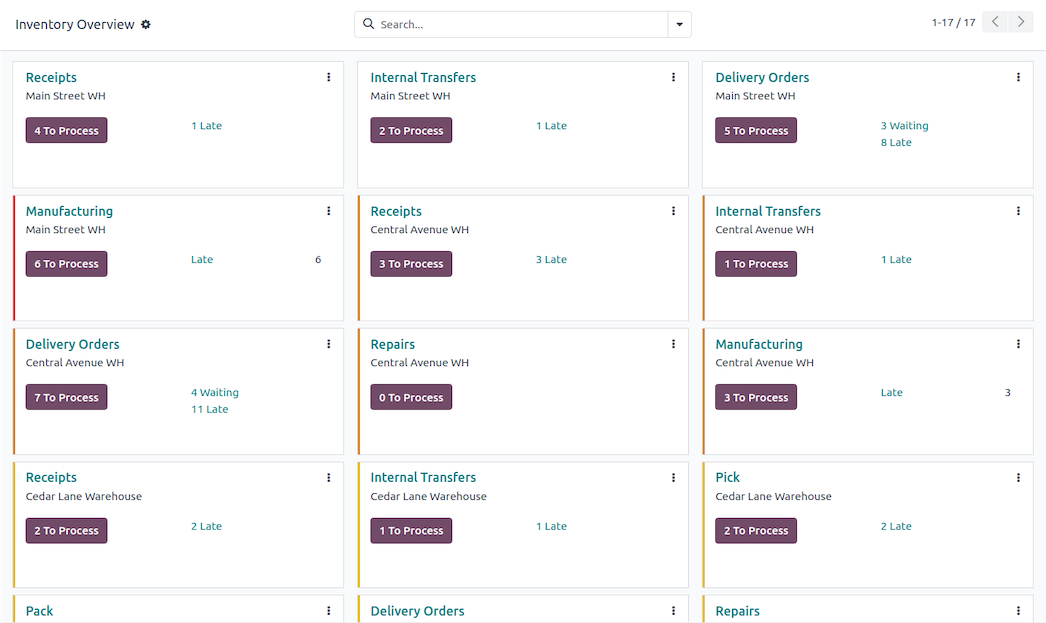
Odoo Inventory overview with a card for each warehouse operation type
Official screenshot from odoo.com/app/inventory, with demo data; it isn't a live view. Open full size
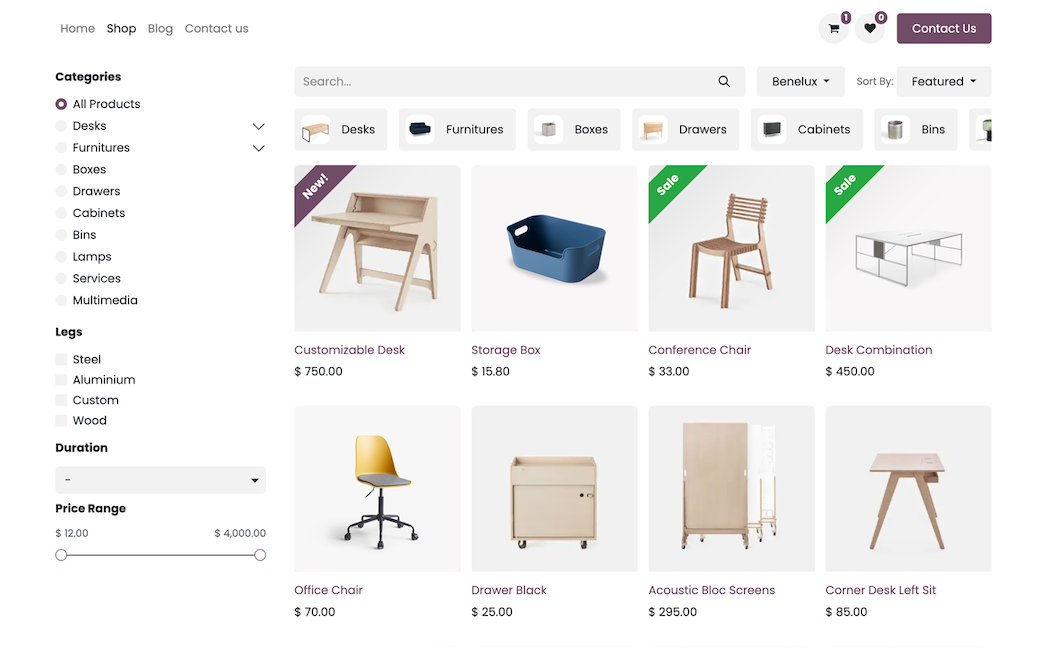
Odoo eCommerce shop page with product grid and category filters
eCommerce shop page. Official screenshot from odoo.com/app/ecommerce.
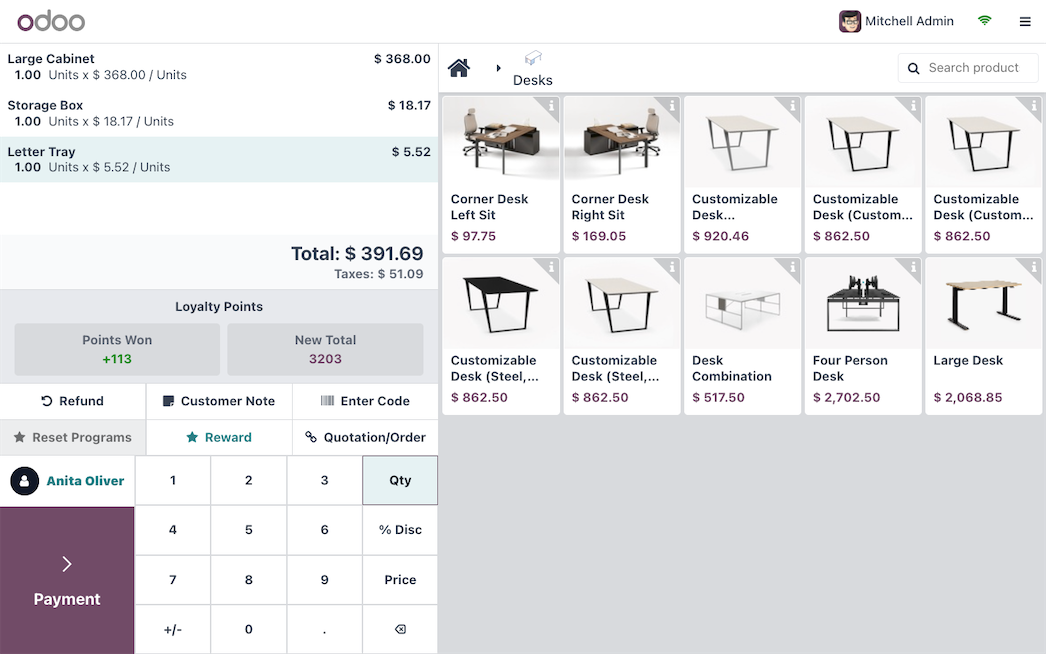
Odoo Point of Sale register with order lines, numeric keypad and product grid
Point of Sale register. Official image from Odoo's Point of Sale app assets.
Odoo shop page, poster for the official Website Builder clip
Watch on odoo.com instead

Official Odoo banner clip (WebM only). It may be silent.

Odoo eCommerce, Website Builder and POS

Odoo eCommerce and Point of Sale

Website hosts your store, eCommerce adds product pages, variants, cart and checkout, and Point of Sale runs the in-store register. All three use the same products, prices and customers, so an online order and a counter sale are recorded against one catalog.

  • Website
  • eCommerce
  • Point of Sale
  • Inventory for shared stock

Shared, real-time stock across channels needs Inventory installed alongside eCommerce and Point of Sale.

Source: odoo.com/app/ecommerce, odoo.com/app/website, odoo.com/app/point-of-sale-shop

Explore Odoo Commerce

Odoo MRP

Odoo Manufacturing and MRP

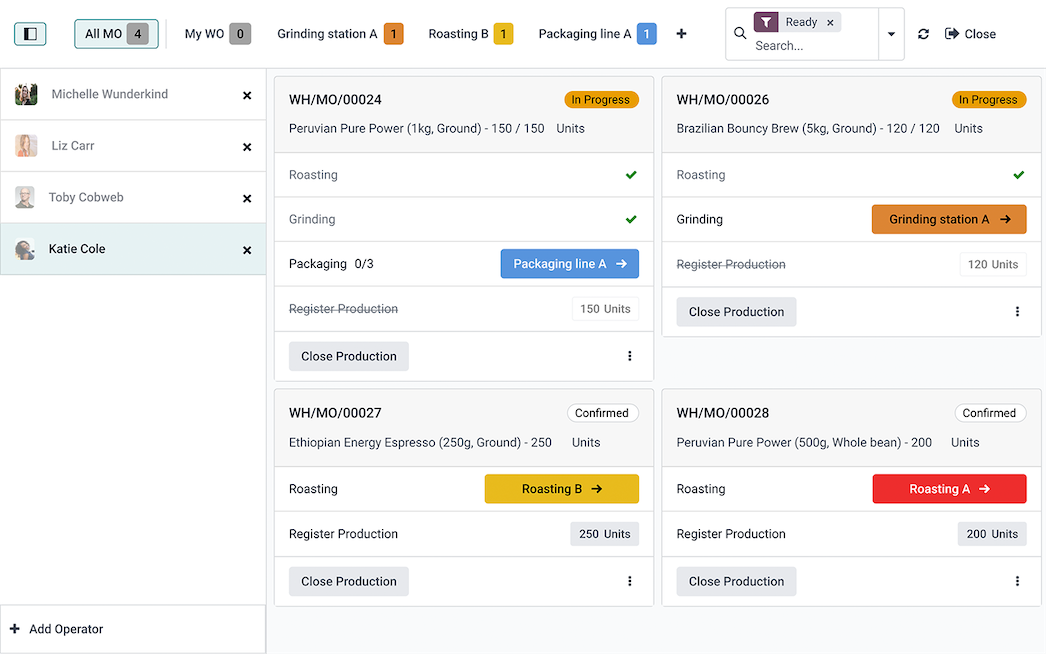
A bill of materials lists the components and quantities for each product, with optional operations at work centers. Manufacturing orders consume components from Inventory. You can create them manually, from a sales order (make-to-order) or from reordering rules. The Master Production Schedule plans longer-term production against a demand forecast you adjust.

  1. Bill of materialsComponents and quantities
  2. OperationsSteps at work centers (optional)
  3. Manufacturing orderConsumes components, produces the product
Illustration of the relationship. It isn't an Odoo screen.
  • Manufacturing
  • Inventory
  • Purchase
  • Quality optional
  • PLM optional

Work orders appear only when operations are added to the bill of materials and enabled in settings.

Source: odoo.com/app/manufacturing. Official tutorial: MRP overview on Odoo eLearning.

Explore Odoo Manufacturing
Odoo Manufacturing shop floor view with manufacturing orders and their work order steps
Shop floor view. Official image from Odoo's Manufacturing app assets. Open full size
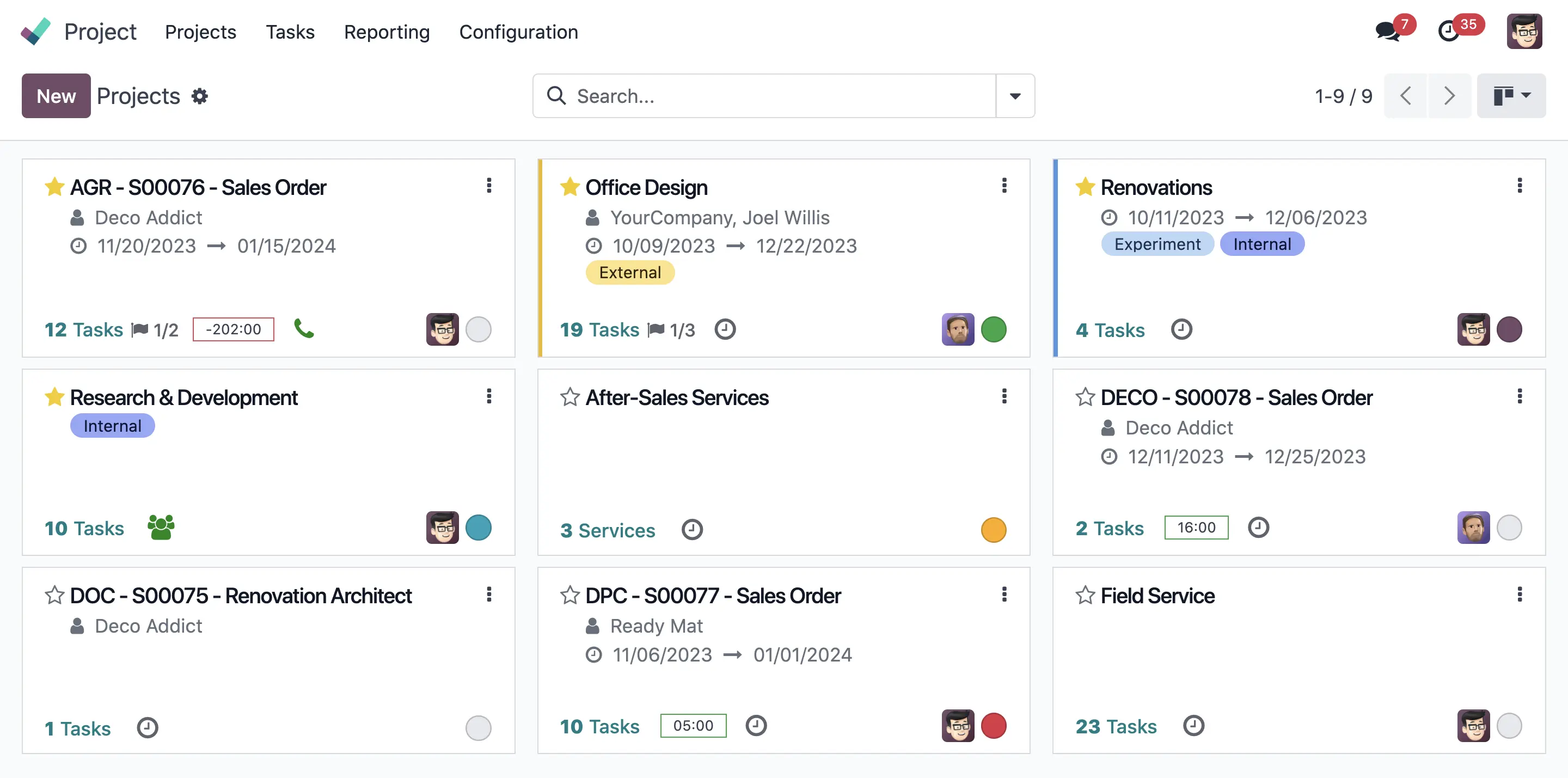
Odoo Project Kanban view listing projects with their tasks and customers
Official screenshot from odoo.com/app/project.
Odoo Project overview, poster for the official Project demo video
Watch on odoo.com instead

Project and team operations

Odoo Project management and Timesheets

Organize tasks in Kanban, Gantt or list views, with subtasks, dependencies and milestones. Team members log hours on tasks in Timesheets, and you can invoice that time or bill by milestone. Project updates show budgets, milestones and profitability, and customers can follow the project in the portal.

  1. TaskPlanned in Project
  2. TimeLogged in Timesheets
  3. InvoiceBilled through Sales

Employees, Time Off and Payroll are separate apps. Payroll rules and HR compliance depend on your country.

Source: odoo.com/app/project, odoo.com/app/timesheet

Explore Odoo Project

Odoo ERP for small business

Where to start, by type of business

Suggested starting app combinations, not a full implementation assessment.

Retail

  • Point of Sale
  • Inventory
  • eCommerce
  • Invoicing

Example: Hardware Store

Sell at the counter with Point of Sale and online with eCommerce. Both draw on the same stock in Inventory, so availability stays in sync once your products and locations are set up.

Services

  • Project
  • Timesheets
  • Sales
  • Invoicing
  • Helpdesk

Example: Marketing Agency

Sell a retainer in Sales, deliver it as a Project, log hours in Timesheets and invoice the time or the milestones you agreed with the client.

Distribution

  • Purchase
  • Inventory
  • Sales
  • Accounting

Example: Beverage Distributor

Replenishment rules propose purchase orders before stock runs low. Customer orders ship along the routes you define, and inventory valuation updates in Accounting.

Manufacturing

  • Manufacturing
  • Inventory
  • Purchase
  • Quality
  • PLM

Example: Custom Furniture

A confirmed sales order can trigger a manufacturing order from the bill of materials. Missing components flow to Purchase, and Quality checks run at your control points.

Browse all industries on odoo.com

Odoo pricing plans

Odoo pricing: One App Free, Standard and Custom

Odoo sets prices by country, currency and billing period, and sometimes offers introductory rates. We couldn't confirm today's figures for every region, so this page doesn't list prices.

See current prices on odoo.com

One App Free

One app with unlimited users. Odoo says hosting and support are included. Apps that your chosen app depends on are installed with it and stay in the free scope.

Runs on Odoo Online. Installing a second standalone app moves you to a paid plan.

Standard

All apps, billed per user, hosted on Odoo Online.

Check current inclusions and rates on odoo.com/pricing.

Custom

All apps plus Odoo Studio, multi-company and external API access, billed per user. You can host on Odoo Online, Odoo.sh or your own servers.

Check current inclusions and rates on odoo.com/pricing.

Costs outside the subscription

Implementation

Configuring workflows and migrating data, either in-house, with a partner or through Odoo's implementation services.

Customization

Custom modules and development, including Odoo's developer services. Custom code may need extra work when you upgrade.

Hosting outside Odoo Online

Odoo.sh and on-premise hosting come with their own costs and responsibilities.

Community edition

Free, open-source software you host, maintain and upgrade yourself. The paid plans use Odoo Enterprise. Compare editions

Before you implement

  • Localization: taxes, charts of accounts, legal reports and payroll depend on your country's localization package.
  • Configuration: the workflow on this page only connects once stages, products, pricelists, warehouses, routes and invoicing policy are set up.
  • Data migration: plan how you'll import customers, products, opening stock and open balances.
  • Customization: start with standard features, since custom code adds work at every upgrade.

FAQ

Questions about Odoo

What exactly is free with Odoo One App Free?

One app with unlimited users. Odoo says hosting and support are included. Apps that your chosen app depends on are installed with it at no charge. Installing a second standalone app moves you to a paid plan. Odoo Community is also free to download, but you host and maintain it yourself.

Is there an Odoo free trial?

Yes. Odoo offers a trial at odoo.com/trial. Check the sign-up page for the current trial terms.

Does the workflow on this page work out of the box?

The apps share one database, but each company sets up its own pipeline stages, products, pricelists, taxes, warehouses, replenishment rules and invoicing policy. Plan for setup time, or work with an implementation partner.

What's the difference between Standard and Custom?

Both include all apps. Custom adds Odoo Studio, multi-company and external API access, and supports Odoo.sh or on-premise hosting. Check current inclusions on odoo.com/pricing.

Are accounting and payroll features the same in every country?

No. Taxes, charts of accounts, legal reports and payroll rules depend on your country's localization. See the Odoo fiscal localization documentation.

Where do I log in to Odoo?

This page is an independent guide and has no login. Existing customers can sign in on Odoo's official sign-in page or at their own database address.

Odoo

Start with the process that costs you the most time

Install that one app free, run it with your team, then connect the next step of your workflow when you're ready.

Start free on odoo.com